


To switch medical billing companies without a cash-flow gap, plan the whole move around one cutover date: the day the new company starts sending your claims. Before that date, read your current contract’s exit terms, sign the new agreement and business associate agreement (BAA), get your data out and move your electronic claim and remittance routes. After it, the old company finishes the claims it still owns, you report the new billing agency to Medicare within 90 days, and you check the first month’s numbers against your own baseline.
Deposits are rarely what stops. Medicare pays by electronic funds transfer into an account in your practice’s name that you control, so the money keeps landing in your bank. What stalls is the work around the money: claims nobody sends, remittances that go to the wrong company, and old accounts receivable (A/R) that nobody follows up. This guide takes each step in order, with the Medicare rules that apply.
Key Takeaways
- Sign the new company’s agreement and BAA before you give notice to the old one, so there is never a stretch with nobody billing.
- Agree in writing who works which claims after the cutover. Medicare’s 12-month filing limit keeps running during a handoff.
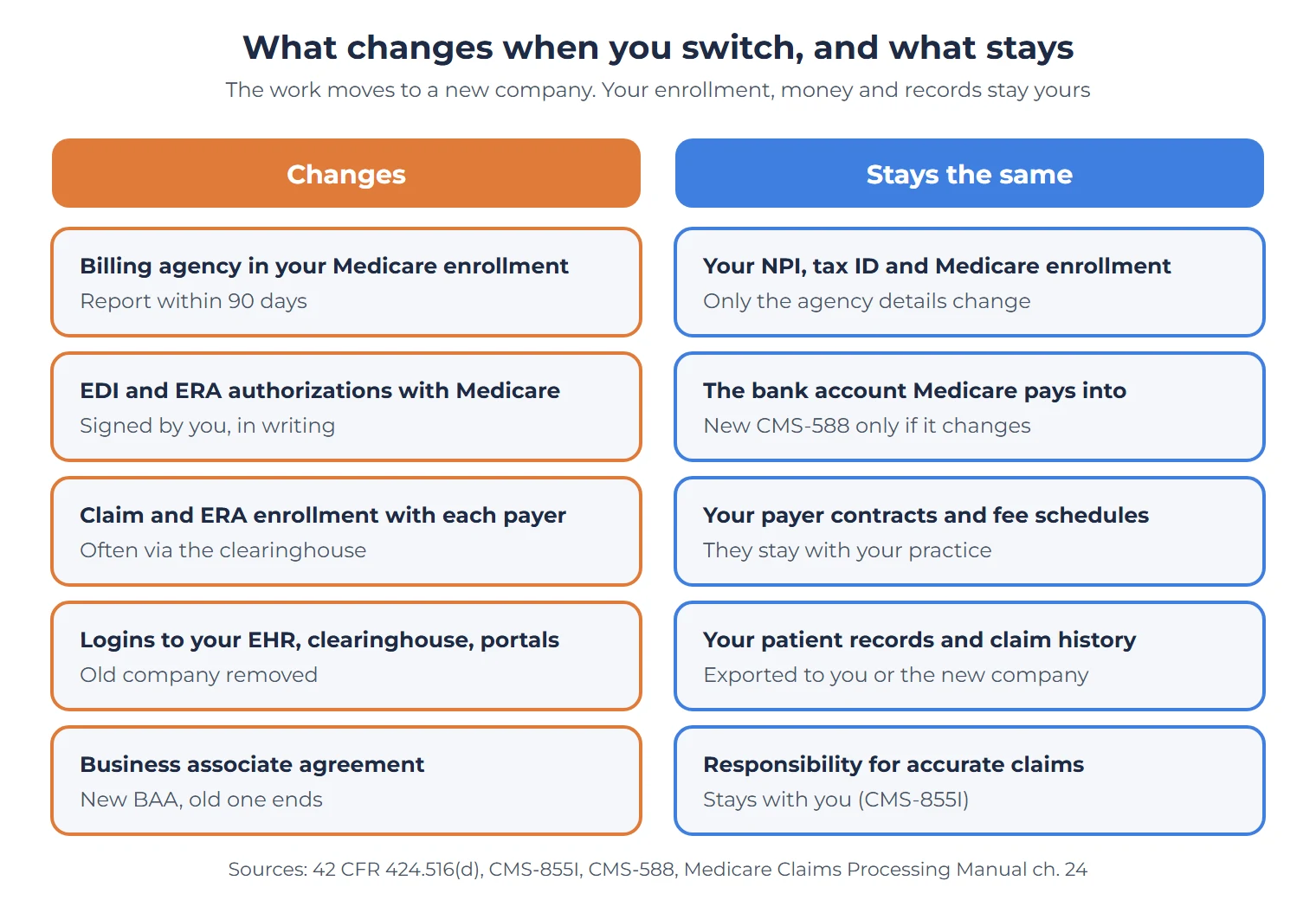
- Tell your Medicare contractor in writing when you change billing agents or clearinghouses. A billing company cannot sign that authorization for you.
- Report the new billing agency in your Medicare enrollment within 90 days. You need a new CMS-588 only if your bank account changes.
- Before you sign off, check that the open A/R in the old company’s export matches its last aging report.
What Causes a Cash-Flow Gap When You Switch Billing Companies?
A cash-flow gap during a switch comes from claims that stop moving, not from deposits that stop. Medicare’s EFT form says the account it pays into “must bear the name of” the enrolled physician or practice (Form CMS-588 instructions, revision 11/2023). The person who signs the form certifies that the practice “has sole control of the account.” CMS’s enrollment manual adds that “all Medicare payments must be made via electronic funds transfer” (Medicare Program Integrity Manual, chapter 10, section 10.6.8). So a billing company that follows those rules does not control your Medicare deposits, and changing companies does not move them.
Four things do cause the gap:
- Claims that nobody sends. Visits from the last weeks with the old company fall between the two companies.
- Remittances that go to the wrong place. If electronic remittance advice (ERA) still flows to the old company, payments sit unposted and denials go unworked.
- Old A/R that nobody follows up. Each company assumes the other has the open claims.
- Authorizations signed late. Medicare exchanges claims and remittances with a billing company only on your own signed authorization, and the billing company cannot sign it for you (Medicare Claims Processing Manual, chapter 24, sections 40.2.2.3 and 50.6).
If your deposits go into an account the old company controls, raise that with your healthcare attorney before you give notice. It changes the order of every step below.
How Long Does It Take to Switch Medical Billing Companies?
A switch takes as long as your current contract’s notice period plus the run-out after it, the time the old company keeps working claims it already sent. Both come from your contracts, not from a federal rule. The one federal deadline is Medicare’s: you have 90 days to report the change in your enrollment. The chart shows how the pieces fit for one example contract.
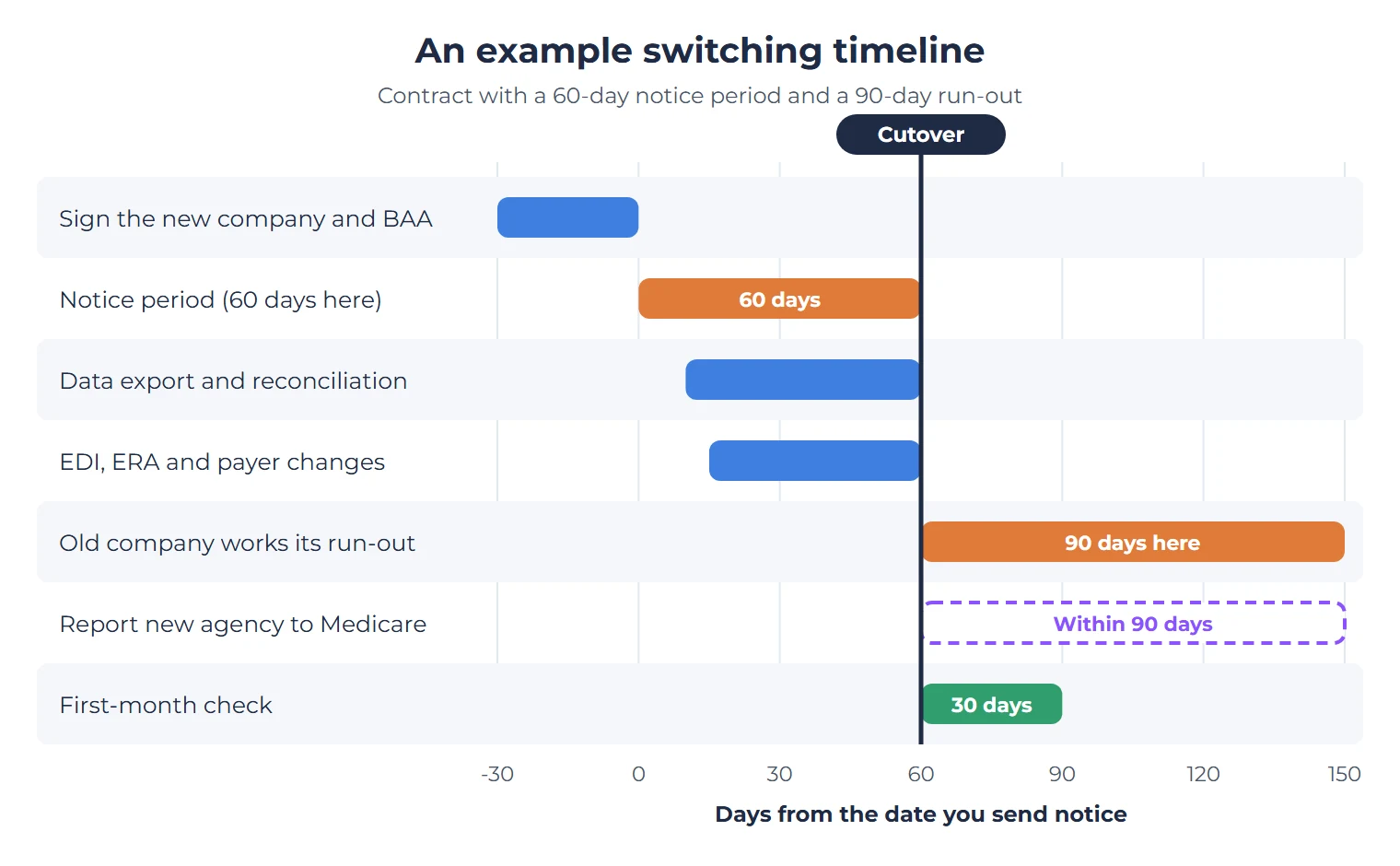
Work backward from the cutover date. Most of Steps 1 to 5 happens before it, and most of Steps 6 to 8 after it.
Step 1: Read the Exit Terms in Your Current Contract
By the end of this step you should know three dates: when notice goes out, when the old contract ends and when the run-out ends. Find these terms in your current agreement:
- Notice period and how notice must be given (in writing, to which address or person).
- Termination fee or a minimum term that has not run out yet.
- Run-out terms: whether the company keeps working claims it sent before the end date, for how long, and what it charges on those collections.
- Data return: what the company hands back, in which format, how soon, and at what cost.
- Transition help: whether the company must answer questions from the new company during run-out.
Our medical billing contract checklist explains each of these clauses and what a fair version looks like.
Pick and sign the new company before you send notice. Notice starts a clock. If the new company is not ready when it runs out, nobody bills your visits. If you have not chosen yet, our guide on how to choose a medical billing company lists the questions to ask first.
Step 2: Sign the New Agreement and BAA Before Any Data Moves
The new company should have a signed BAA before it sees a single patient record. HIPAA lists “billing” among the functions that make a company a business associate (45 CFR 160.103), and the BAA must meet the contract terms in 45 CFR 164.504(e).
Use the new agreement to settle the handoff too. It should name the cutover date, say which claims the new company takes on, and say who gets access to your practice management system, clearinghouse and payer portals.
Medicare keeps the responsibility for claims with you whichever company files them. The physician enrollment form says: “Even if you use a billing agency/agent, you remain responsible for the accuracy of the claims submitted on your behalf” (Form CMS-855I, section 8). Our guide to medical billing company liability explains what that means in practice.
Step 3: Set the Cutover Date and Decide Who Works Which Claims
By the end of this step, every open and future claim should have one owner. Choose the cutover date first, then pick one of three ways to split the work and write it into both agreements.
| How you split | Old company works | New company works | Watch for |
|---|---|---|---|
| By date of service | Every claim with a date of service before cutover, until the run-out ends | Every claim with a date of service on or after cutover | Late charges for visits before cutover. Say who sends them. |
| By submission | Every claim it has already sent | Everything not yet sent, whatever its date of service | Older unsent claims close to their filing limits |
| Full transfer at cutover | Nothing after cutover | All open A/R, old and new | A heavy first month for the new company, which needs your full claim history |
The split by date of service is usually the easiest to audit, because a single field on each claim decides who owns it. Whichever split you choose, watch the filing limits. A Medicare claim “must be filed no later than the close of the period ending 1 calendar year after the date of service” (42 CFR 424.44). Commercial plans set their own limits in your payer contracts. Before cutover, list every unsent or denied claim by age so none of them crosses its limit during the handoff.
When the run-out ends, ask the old company for a list of the claims still open on its last day. Those claims need a new owner straight away. That aged-claims work is what an A/R recovery team does.
Step 4: Get Your Data Out and Reconcile It
By the end of this step you should hold a complete copy of your billing data and know that it adds up. How much work that takes depends on whose system holds your claims. If your claims live in your own practice management system or EHR, the switch is mostly a change of logins. If they live in the old company’s software, the export is your claim history, so ask early.
Ask for these files, in a format you can open (spreadsheet or CSV, plus PDFs of letters):
- open A/R by claim: payer, date of service, amount billed, status and last action
- the denial worklist with reason codes and appeal deadlines
- unapplied payments and credit balances
- patient balances and statement history
- payer letters and appeal files
- remittance (835) history for at least the run-out period
- charges entered but not yet billed
- your payer enrollment records: payer IDs and effective dates
- a list of every login the old company holds in your systems
Then reconcile. The total open A/R in the export should match the old company’s last aging report. Ask about any difference before you sign off, because nobody will explain it later.
HIPAA’s rule for the end of a BAA is that the business associate must, “if feasible, return or destroy” the patient information it holds (45 CFR 164.504(e)(2)(ii)(J)). Return or destroy is not the same as an export you can use, which is why the contract should name the format. The old company still needs your data to finish its run-out, so ask for written confirmation of return or destruction after the run-out ends, not on the cutover date.
Step 5: Move Your Claim and Remittance Routes
By the end of this step, claims from the new company should reach every payer and remittances should come back to the right place. Medicare has three rules here, all in chapter 24 of the Medicare Claims Processing Manual:
- Tell your contractor in writing. A provider must notify its Medicare contractor in writing when it will “change a billing agent or clearinghouse” (section 50.6). The same section says a billing agent or clearinghouse representative “is prohibited from signing an authorization on behalf of a provider,” even when you have a contract with it. You sign.
- Authorize remittances yourself. A billing agent or clearinghouse “cannot be sent remittance advice transactions for a provider unless specifically authorized to do so by that provider,” and the contractor needs your original signature on that authorization (section 40.2.2.3). You must also sign Medicare’s ERA enrollment form before your contractor sends ERA, directly or through a billing company (section 30.4).
- One receiver at a time. Remittance files go “either to the provider or to a designated receiver (which may be the submitter or another entity, but not both)” (section 30.3).
That last rule shapes your run-out. Once Medicare remittances go to the new company, the old company loses the payment detail it needs to finish its claims. Agree in writing who receives remittances during the run-out and how the other company gets copies, for example a weekly file of 835s or read access to the payer portal.
Commercial payers each run their own claim and ERA enrollment, often through the clearinghouse. List your payers by volume and start with the largest. Leave your EFT alone: if the bank account does not change, Medicare needs no new CMS-588, and your payers need no new EFT forms. If you want help with the payer forms, this is the work our payer enrollment team handles.
Step 6: Report the New Billing Agency to Medicare Within 90 Days
By the end of this step, your Medicare enrollment should show the new billing agency and no longer show the old one. Medicare’s rule for physicians, other practitioners and their group practices is 42 CFR 424.516(d). A change of ownership, an adverse legal action or a change of practice location must be reported within 30 days. For everything else, the rule says: “All other changes in enrollment must be reported within 90 days.” The Program Integrity Manual repeats the rule in section 10.4.4, last revised in July 2026.
A billing agency change falls in the 90-day group. It is not one of the three 30-day events. The billing agency is also part of your enrollment: the manual says the provider “shall complete the Billing Agency section” of its enrollment form “with information about all billing agents it utilizes” (section 10.6.8).
How to file it:
- In PECOS, open the Billing Agency section: section 8 of Form CMS-855I for an individual, or of Form CMS-855B for a group.
- Remove the old company and add the new one, each with its effective date.
- Check two addresses while you are there. On the CMS-855I, paper remittance notices and special payments go to the address in section 4C, which some practices set to their billing company. The correspondence address in section 2D “cannot be a billing agent or agency’s address.” If the old company’s address appears in either field, update it in the same filing.
One exception: the CMS-855I says you do not complete section 8 if you reassign 100% of your Medicare benefits. In that case the billing agency belongs in the group’s enrollment.
Step 7: Settle Patient Balances and Credit Balances
By the end of this step, patients should get statements from one company, and every credit balance should have an owner. From the cutover date, only one company should send patient statements. If the phone number or payment address on the statement changes, tell patients on the first new statement. Agree that the old company forwards any patient payments and calls it receives during the run-out.
Credit balances need the same care. Medicare requires overpayments to be reported and returned by “the date which is 60 days after the date on which the overpayment was identified” (42 CFR 401.305(b)). That duty sits with your practice, not with either billing company. Make sure the credit balance list moves with the A/R, and name the person who reviews it each week until it is clear.
Step 8: Check the First 30 Days Against Your Baseline
By the end of the first month, you should know whether the switch is working. Before cutover, save a baseline from the last three months: charges, collections, A/R by age and denials by reason. Then work through this list:
- Every visit since cutover has a claim. Compare visits in your schedule with claims sent.
- The first claims were accepted by Medicare and your top payers, and any rejections were fixed.
- Remittances arrive at the right receiver for each payer.
- Deposits in the bank match the payments posted.
- The old company’s run-out report arrives on the agreed schedule.
- Denials are worked, with reasons tracked. Our denial management page explains what that work covers.
- The old company’s logins are removed from your EHR, clearinghouse and payer portals.
- The Medicare enrollment change is filed, and you have the confirmation.
- Patient statements go out under one name and one phone number.
If a number moves the wrong way, ask the new company to explain it against the baseline. A good company will have its own version of this list.
How Summit Billing Solutions Handles a Switch
Summit Billing Solutions is a medical billing and revenue cycle management company founded in 2023, headquartered in Salem, New Hampshire, and serving practices in all 50 states. We sign a BAA with every practice before we see any patient data, and we work with any EHR and any specialty. Our first-pass claim rate runs at 95% to 98%. Our fee is a percentage of monthly collections, and we quote your exact rate after a free account review. You can read more about our medical billing services.
Want to know where your claims stand before you give notice?
Request a free account review. We look at twelve months of your claims, your aging by bucket and your denials by payer and reason, and we show you written findings before you commit to anything.
This guide explains Medicare and HIPAA rules in general terms. It is not legal advice. Ask a healthcare attorney to review your contracts before you give notice.
Frequently Asked Questions About Switching Medical Billing Companies
1. How long does it take to switch medical billing companies?
It takes as long as your current contract’s notice period, plus the run-out period in which the old company finishes claims it already sent. Both come from your contracts. The one federal deadline is Medicare’s: report the new billing agency in your enrollment within 90 days of the change.
2. Do I have to tell Medicare when I change billing companies?
Yes, in two ways. Notify your Medicare contractor in writing when you change billing agents or clearinghouses, and sign the EDI and ERA authorizations yourself, because a billing company cannot sign them for you. Then update the Billing Agency section of your enrollment within 90 days under 42 CFR 424.516(d).
3. Who owns my accounts receivable when I switch billing companies?
You do. CMS’s enrollment manual says a billing agency submits claims in the name and billing number of the provider that furnished the service, so the claims and the money owed on them are yours. Your contracts decide only who works each claim during the run-out.
4. Do I need a new CMS-588 when I change billing companies?
Only if your bank account changes. Medicare pays into an account in your practice’s name under your sole control, so a change of billing company alone does not touch the EFT enrollment.
5. Can my old billing company keep my patient data after I leave?
Under HIPAA, a business associate must return or destroy your patient information at the end of the contract if that is feasible. If it is not feasible, the BAA’s protections continue to apply to what it keeps. Ask for written confirmation after the run-out ends.