


The CO-B11 denial code means the payer that received your claim has passed it to another payer or processor that it believes is responsible, and it will not pay the claim itself. X12 defines claim adjustment reason code (CARC) B11 as “The claim/service has been transferred to the proper payer/processor for processing. Claim/service not covered by this payer/processor.” (X12 claim adjustment reason codes, retrieved 2026-11-26). The “CO” in front is the contractual obligation group code, so you should not bill the patient for the line. You should not write it off either, because the claim is now with someone else.
That makes B11 a routing message rather than a coding error. In most cases nothing on the claim needs to change. The work is finding out where the claim went, confirming that it arrived, and making sure nobody sends it again. When B11s keep coming back for the same patient, the coverage details collected at the front desk are the first thing to check.
This guide explains what B11 means on your remittance, where claims go after one, how to confirm the other payer has the claim, why a rebill makes things worse, and how B11 differs from CO-11. If you searched for “COB 11” or “COB11”, this is the code you want: group code CO plus reason code B11, written without the hyphen. It is easy to misread, because COB is also the usual short form of coordination of benefits.
Key Takeaways
- B11 is a routing code. The payer says another payer or processor is responsible and that the claim has been transferred there.
- Do not rebill the same payer. Blue Cross and Blue Shield of Texas warns that a resubmitted unpaid claim “will be denied as a duplicate.”
- Confirm before you assume. Find out who has the claim, then check its status with that payer. Some plans, such as SCAN Health Plan, tell providers to contact the delegate or bill the supplemental vendor directly.
- Repeat B11s point to coverage data. Ask about other insurance at every visit and record which plan is primary before the claim goes out.
- CO-B11 is not CO-11. CO-11 is a diagnosis and procedure mismatch on one service line.
What Does the CO-B11 Denial Code Mean?
CO-B11 has two parts: CO is the group code and B11 is the reason code. CMS tells its contractors to use these codes to show “who is financially responsible” for an unpaid amount. Its definitions are short. CO (contractual obligations) covers adjustments that “are not billed to the patient.” OA (other adjustments) is used when no other group fits. PR (patient responsibility) marks amounts that may be billed to the patient (Medicare Claims Processing Manual, chapter 22, section 60.1).
The B11 text says two things. First, the claim “has been transferred to the proper payer/processor.” Second, the payer that sent the remittance does not cover it. B11 has been in the X12 list since January 1, 1995, and it carries no note that limits it to one group code, so you may also see it as OA-B11.
A payer can add a remark code to explain the move. SCAN Health Plan, a Medicare Advantage plan, pairs B11 with remark code N418, which reads “Misrouted claim. See the payer’s claim submission instructions” (SCAN Health Plan, Provider Reason Code FAQs, September 2024; X12 remittance advice remark codes). Read every remark code on the line before you act, since it often names the reason.
Do You Need to Appeal a CO-B11?
Usually not. An appeal argues that a payer decided a claim wrongly. B11 says this payer is not the one that decides. If the claim reached the right payer, an appeal to the first payer only adds a step and a delay.
The exception is a transfer that was wrong. SCAN’s guidance shows the order to follow. First, look up the entity responsible for the claim in the “Address to Submit Claims” field on SCAN’s provider portal and contact that delegate for status. If the delegate says SCAN is responsible, check whether the service is a supplemental benefit, which SCAN says should be billed directly to the supplemental vendor. Only for a medical service does SCAN tell providers to file a provider dispute with SCAN itself.
Other payers use other forms and portals, but the order is the same: find out who has the claim, ask that payer, and dispute with the first payer only if the transfer turns out to be wrong. That kind of follow-up is everyday denial management work.
Where Does a Claim Go After a B11?
It depends on who sent the B11. The routes below are common ones, each with the payer rule behind it. Two of them are not B11 situations at all, and they are included because the remittance codes look alike and the right next step is different.
A Medicare Advantage plan and its delegate or benefit vendor
Plans that hand claims to another processor are the clearest B11 case. SCAN’s guidance describes two kinds: a delegate, named in the “Address to Submit Claims” field on its portal, and a supplemental vendor, to which SCAN says supplemental provider claims should be submitted directly. When SCAN sends B11 with N418, its instructions have three parts: confirm the responsible entity in the portal, contact that delegate for the claim’s status, and bill supplemental services to the supplemental payer (SCAN Health Plan, retrieved 2026-11-26).
Note what that means in practice. The code says “transferred,” but the plan still expects you to check with the delegate and, for supplemental benefits, to send the claim to the vendor yourself. Do not assume a B11 claim is sitting safely in someone else’s queue until that payer confirms it.
A Blue plan and the member’s home plan
Blue Cross and Blue Shield plans route claims among themselves through the BlueCard Program. You file with the Blue plan in your area. That plan forwards the claim to the member’s home plan, which applies the member’s benefits. Your local plan then issues the remittance and pays you (BCBSTX BlueCard Program Provider Manual, June 2026, pages 8 and 9). When a Blue plan is primary and another payer is involved, the manual says to send the other party liability information with the claim. The local plan then “will electronically route the claim to the member’s BCBS Plan” (page 29).
Two practical points follow. Your local Blue plan stays your contact for status, even while the claim sits with another plan. And the three-character prefix on the member ID card decides where the claim goes: BCBSTX says claims with “incorrect or missing prefixes” cannot be processed (page 29). If a Blue remittance shows B11, ask the local plan which plan or processor now has the claim before you do anything else.
Medicare and the patient’s supplemental payer (crossover)
Medicare reports this with remark codes rather than B11, but it is the most familiar example of one payer sending a claim on to another. After a Medicare contractor processes a claim, it can send the claim and its payment data on to the patient’s other payer. The transfer runs through CMS’s Benefits Coordination & Recovery Center (BCRC), under a coordination of benefits agreement (COBA) (Medicare Claims Processing Manual, chapter 28, section 70.6). The receiving payers include Medigap insurers, other supplemental plans, TRICARE, CHAMPVA and state Medicaid agencies, each with its own range of COBA ID numbers.
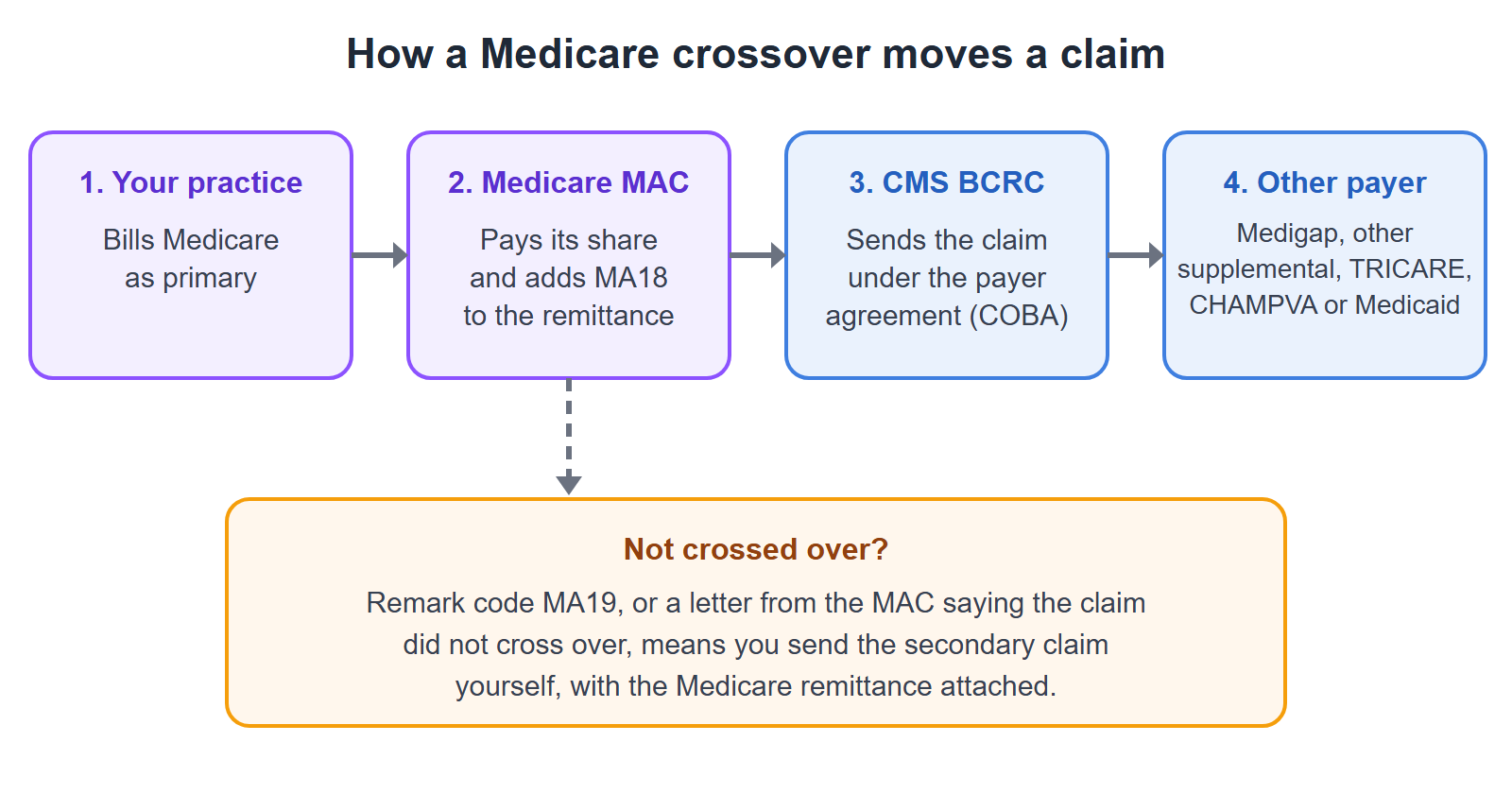
Medicare’s remittance tells you what happened to the claim:
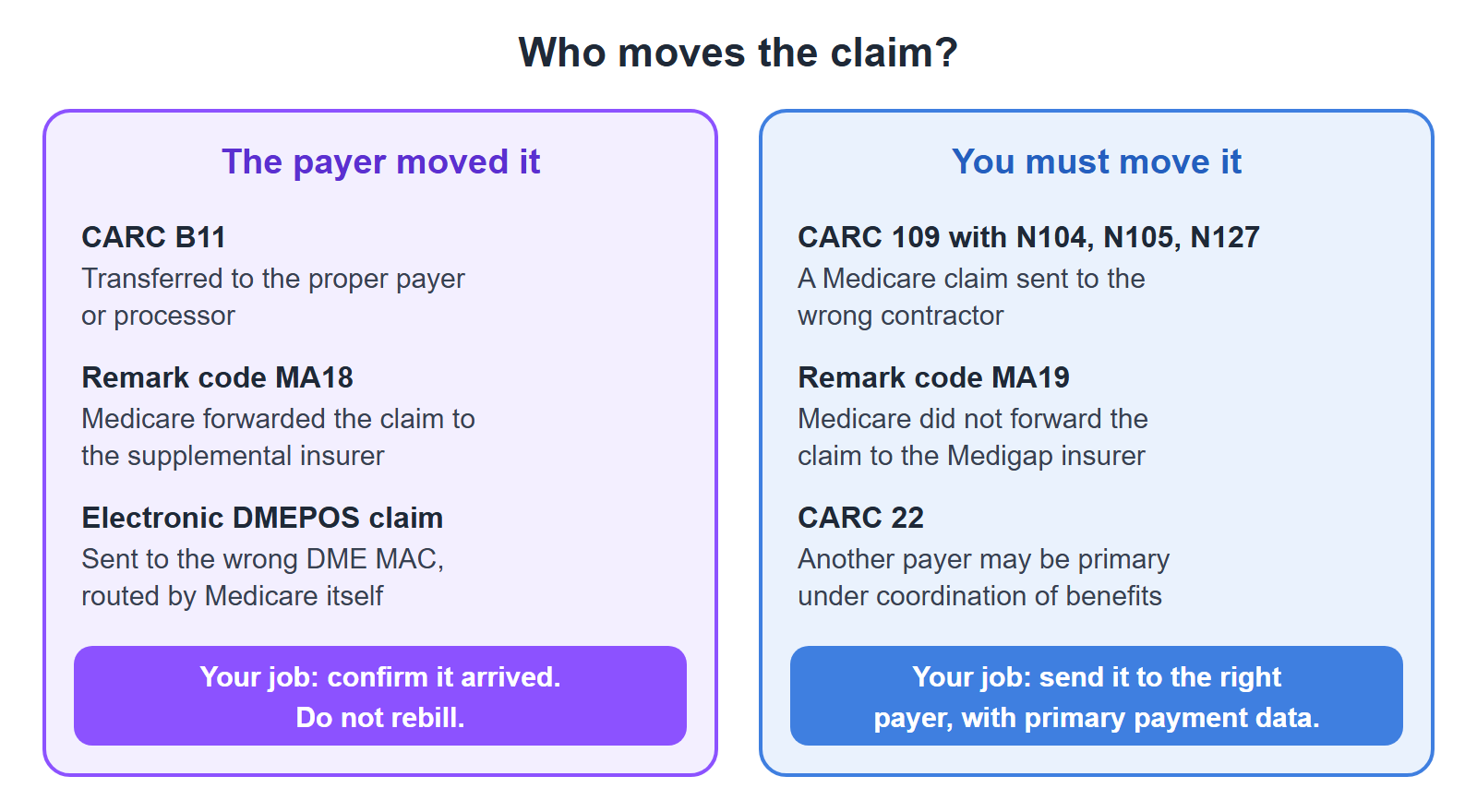
- MA18: “The claim information is also being forwarded to the patient’s supplemental insurer.” Wait for the secondary payment.
- MA19: the claim was not sent to the Medigap insurer because the insurer information was incorrect or invalid, so you submit the secondary claim directly (chapter 28, section 50).
- N89: the payment information went to more than one other payer, but the remittance can name only one. CMS confirms that the electronic remittance carries only one crossover payer name, even when the claim goes to several (chapter 22).
A crossover can also fail after the remittance, for example when the other payer rejects the data. The Medicare contractor then normally has five business days from receiving the BCRC error report to notify you. Its letter says the claim “was/were not crossed over due to claim data errors or was/were rejected by the supplemental insurer” (chapter 28, section 70.6.1). BCBSTX states the matching rule from the secondary payer’s side. If the Medicare remittance shows the claim crossed over, do not resubmit it. If it shows the claim did not cross over, submit it with the Medicare remittance (BlueCard manual, page 61).
A Medicare claim sent to the wrong contractor
This route is the contrast. When a Part B Medicare contractor receives a claim that belongs to another contractor, a DME MAC, the Railroad Retirement Board’s contractor or the United Mine Workers of America, Medicare does not pass it along. The claim “shall be returned as unprocessable” with group code CO and CARC 109. A remark code names the problem: N104 for another contractor’s jurisdiction, N105 for a Railroad Retirement beneficiary and N127 for a United Mine Workers beneficiary (Medicare Claims Processing Manual, chapter 1, section 10.1.9). CARC 109 says it plainly: “You must send the claim/service to the correct payer/contractor.”
The one exception in that section is an electronic DMEPOS claim sent to the wrong DME MAC. Medicare routes it to the right DME MAC itself, so there is nothing to resend.
How Do You Confirm the Other Payer Received the Claim?
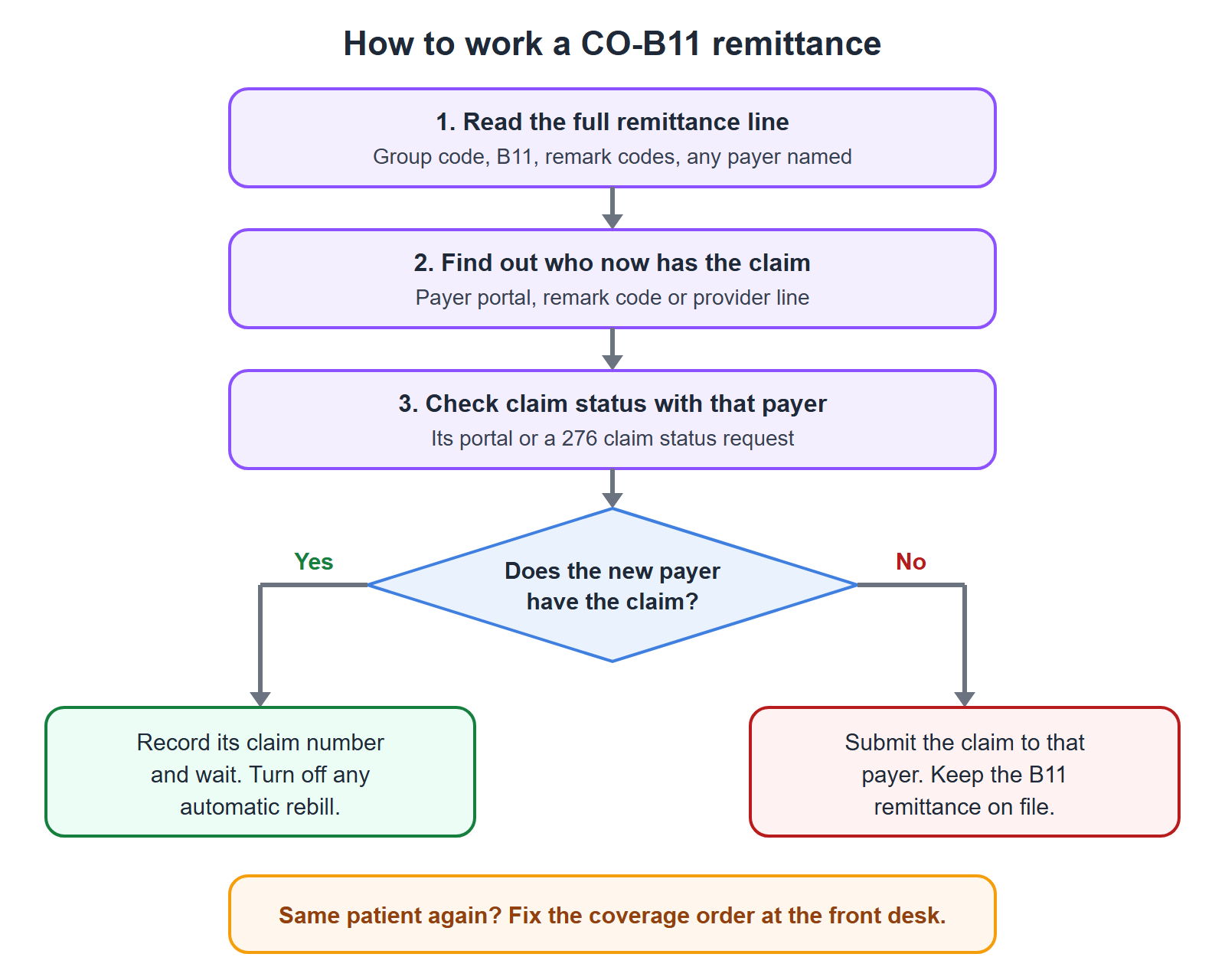
Treat a B11 as an open item until the new payer confirms it has the claim. These five steps cover most cases.
- Read the whole remittance line. Note the group code, B11, each remark code and any other payer named on the remittance.
- Find out who has the claim. Use the first payer’s portal or provider line. SCAN, for example, shows the responsible entity in its “Address to Submit Claims” field. For a Blue member, ask your local Blue plan.
- Check status with the new payer. Use its portal or an electronic claim status request (the HIPAA 276 transaction that BCBSTX names for status checks, page 29). If the new payer has no record under the patient’s ID, ask whether it holds the claim under another ID number.
- If the new payer has the claim, wait. Record its claim number and the date you checked, so nobody on your team rebills it.
- If the new payer has no record, send the claim to that payer. Keep the B11 remittance with the account. It shows when you first filed and where the first payer sent the claim.
Old claims that stalled between two payers often need the same steps under time pressure, which is where A/R recovery work comes in.
Why Does Sending the Claim Again Make It Worse?
A second copy of a claim that is already in process does not move it faster. BCBSTX tells providers not to send duplicate claims and warns that “having your billing agency resubmit claims automatically” slows payment and confuses the member (BlueCard manual, page 29). It adds that an unpaid claim that is resubmitted will be denied as a duplicate, which sends the patient more than one explanation of benefits (page 55).
X12 has codes for exactly this. CARC 18 means “Exact duplicate claim/service,” for use with group code OA except where state workers’ compensation rules require CO. Remark code N522 flags a “Duplicate of a claim processed, or to be processed, as a crossover claim.” Each duplicate denial is one more line someone has to work, and it can hide the original claim’s real status.
What to do instead:
- Stop automatic rebills on B11 lines. Set your billing system or clearinghouse rules so that a B11 goes to a person, not back out the door.
- Log the follow-up. Record the new payer, its claim number and the next check date on the account.
- Ask your billing company how it reports them. Transferred claims belong in the denial log of what your medical billing company should report every month, with their status.
When Does B11 Point to a Coordination of Benefits Problem?
When a payer moves a claim because it believes another payer comes first, the fix is at registration, not on the claim. Watch for three patterns. The first is B11s that repeat for the same patient. The second is a transfer to a plan the patient says has ended. The third is a B11 followed by CARC 22, “This care may be covered by another payer per coordination of benefits.”
For Medicare patients, the duty to ask is written into the rules. Section 1862(b)(6) of the Social Security Act requires anyone billing Part B to fill in the other-insurance part of the claim from information the patient gives. CMS adds that providers, physicians and other suppliers must determine whether Medicare is primary “by asking Medicare beneficiaries, or their representatives, questions concerning the beneficiary’s MSP status” (Medicare Secondary Payer Manual, chapter 3, section 20.1). CMS publishes model intake questions in section 20.2.1 and allows the check to run alongside the X12 270 eligibility inquiry and 271 response.
Medicaid handles known other coverage differently. When a state Medicaid agency has established that another payer is probably liable at the time a claim is filed, federal rules say it “must reject the claim and return it to the provider” (42 CFR 433.139). So a missing primary payer can come back from Medicaid as a rejection instead of a transfer.
A front-desk routine that prevents most repeat transfers:
- Ask about other coverage at every visit, not only at the first one. CMS wrote its model questions for hospitals, to be asked at every admission, outpatient encounter or start of care, and the habit works in any practice.
- Scan both sides of every card and record which plan is primary, secondary and tertiary.
- For Blue members, enter the full ID with its prefix. On professional claims, BCBSTX also asks that box 11D (other health benefit plan) be marked yes or no, because leaving it blank can stop the claim while the member’s plan investigates coordination of benefits (BlueCard manual, page 55).
- Run an electronic eligibility check before the visit and read the response for other coverage. Our insurance eligibility verification service does this before the patient arrives.
- When a payer’s coverage order is wrong, ask the patient to update it with the plan. BCBSTX points providers to a coordination of benefits questionnaire for exactly this reason (page 55).
How Is CO-B11 Different From CO-11?
Only the number looks alike. CARC 11 says “The diagnosis is inconsistent with the procedure.” It is a coding problem on one service line, and the fix is in the codes or the documentation. B11 is about which payer handles the claim, and the codes on the claim are usually fine. If your remittance shows CO-11, our guide to the CO-11 denial code walks through the causes and fixes.
Here is how B11 compares with the codes it is most often confused with, using the X12 definitions:
| Code | What it says, and what you do |
|---|---|
| CARC B11 | Transferred to the proper payer or processor and not covered here. Find the new payer and confirm it has the claim. |
| CARC 109 | Not covered by this payer or contractor, and you must send it to the correct one. Submit the claim to the right payer yourself. |
| CARC 22 | May be covered by another payer per coordination of benefits. Bill the primary payer first, or have the coverage order corrected. |
| CARC 24 | Covered under a capitation agreement or managed care plan. Bill the managed care plan instead. |
| CARC 18 | Exact duplicate claim or service. Check the first claim’s status instead of sending another copy. |
| CARC 11 | The diagnosis is inconsistent with the procedure. Fix the diagnosis link or the documentation, then correct or appeal. |
| RARC N418 | Misrouted claim. Follow the payer’s claim submission instructions. |
| RARC MA18 | Medicare forwarded the claim to the supplemental insurer. Wait for the secondary payment. |
| RARC MA19 | Medicare did not forward the claim to the Medigap insurer. Send the secondary claim yourself. |
How Summit Works CO-B11 Denials
Summit Billing Solutions has worked denials for practices since 2023, from our headquarters in Salem, New Hampshire, for practices in all 50 states, on any EHR and in any specialty. Our first-pass claim rate is 95-98%. A B11 is treated as an open item, not a write-off: we confirm which payer has the claim, check its status there, and flag the registration details for correction when the same patient keeps coming back. It is part of our denial management services.
Want to know how many of your denials are routing problems rather than coding problems?
Summit Billing Solutions will review your recent remittances, sort the denials by cause and payer, and show you which ones are still recoverable.
Frequently Asked Questions About the CO-B11 Denial Code
1. What does the CO-B11 denial code mean?
CO-B11 means the payer transferred the claim to the payer or processor it considers responsible and will not pay it. X12 defines CARC B11 as “The claim/service has been transferred to the proper payer/processor for processing. Claim/service not covered by this payer/processor.” CO is the contractual obligation group code.
2. Can I bill the patient for a CO-B11 denial?
No. CMS defines group code CO as adjustments that are not billed to the patient. The balance belongs with the payer that now has the claim. Once that payer processes it, its own remittance will show any amount the patient owes as patient responsibility (PR).
3. Is COB 11 the same as CO-B11?
Yes. “COB11” and “COB 11” are CO-B11 written without the hyphen: group code CO plus reason code B11. It is easy to mix up because COB is also short for coordination of benefits, which has its own reason code, CARC 22.
4. Should I resubmit a claim that was denied with B11?
Not to the same payer. First find out which payer has the claim and check its status there. If that payer has it, wait. If it has no record, submit the claim to that payer. A copy sent back to the first payer is likely to be denied as a duplicate.
5. What is the difference between B11 and 109?
With B11, the payer says it transferred the claim to the right payer or processor. With CARC 109, the payer says the claim is not its responsibility and you must send it to the correct one. Medicare uses 109, with remark code N104, N105 or N127, when a claim reaches the wrong Medicare contractor.